
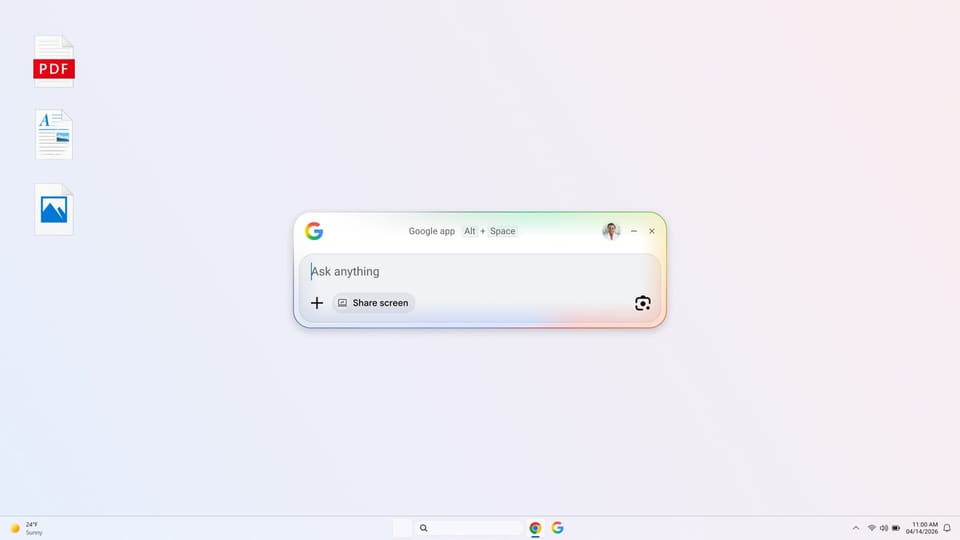
Google app for desktop is available globally in English on Windows
Google has officially launched its upgraded Google app for desktop, providing Windows users around the world with access to the full capabilities of Google Search directly from their computers. The application is now available in English, offering a streamlined experience that integrates AI-powered features to help users find information and complete tasks without interrupting their workflow.
AI-powered search and accessibility
The core of the new desktop experience is the integration of AI Mode, which allows users to ask questions and receive helpful, AI-generated responses complete with links to relevant web sources. This functionality is designed to provide quick answers to complex queries, ensuring that users can find the information they need while remaining focused on their current tasks.
Accessibility is a primary feature of the app, centered around a simple keyboard shortcut. By pressing Alt + Space, users can instantly open a search box that scans across multiple locations. This unified search tool covers information from the web, files stored locally on the computer, installed applications, and documents saved in Google Drive.
Enhanced workflow and visual search
To maintain productivity, the Google app for desktop includes a screen-sharing feature. Whether a user is browsing the web or working within a document, they can select a specific window or their entire screen to ask questions. This allows for continuous interaction with the search assistant without the need to switch between different applications or break the user's flow.
The app also incorporates Google Lens, enabling users to search for anything visible on their screen. This tool simplifies a variety of tasks, such as translating text, interpreting images, or receiving assistance with homework problems. By allowing users to select and search visual elements directly from their desktop, the app provides a versatile way to interact with digital content.