
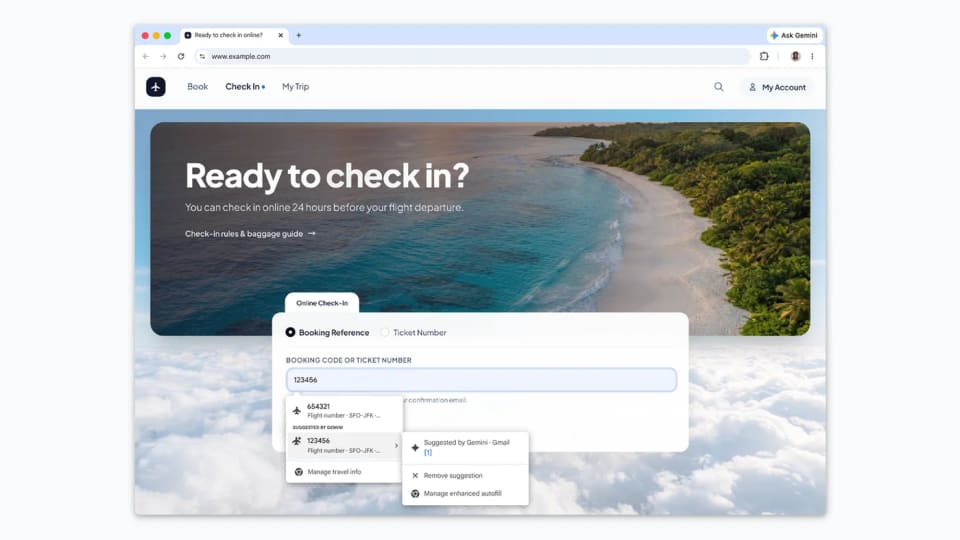
Bringing booking details into a form
Chrome’s enhanced autofill can now suggest information from Gmail while a user fills out an online form, according to Google’s announcement. The feature uses Gemini with Personal Intelligence to surface details such as order numbers, tracking information and flight bookings.
The intended convenience is specific: instead of leaving a form to locate a detail in an email, the user can receive a suggestion in the form workflow. This extends autofill beyond the basic identity, address and card information discussed in the announcement.
Eligibility and controls matter
The rollout is beginning in the United States on desktop, Android and iOS. It is for Gemini in Chrome users with Personal Intelligence enabled. Those conditions should stay attached to the feature description; the announcement does not mean that every Chrome installation or every country has access.
Google says users can manage whether enhanced autofill is enabled and what it can access through Chrome settings. It also says sensitive data is encrypted. The brief post does not give a complete technical account of every processing or retention detail, so that statement should not be expanded into additional privacy guarantees.
Review the suggestion before submitting
A sensible first use would be a form where the user can compare the suggested detail with the original email. Order numbers and booking references are useful precisely because they are specific; a plausible-looking value from the wrong transaction would not complete the intended task.
The announcement describes assistance with entering information, not a replacement for checking the destination form or the value being submitted. People evaluating it should confirm that the necessary settings are enabled, inspect the access controls and test a familiar example. That keeps the claimed convenience tied to the actual workflow rather than assuming that an email-derived suggestion must be the right one.