
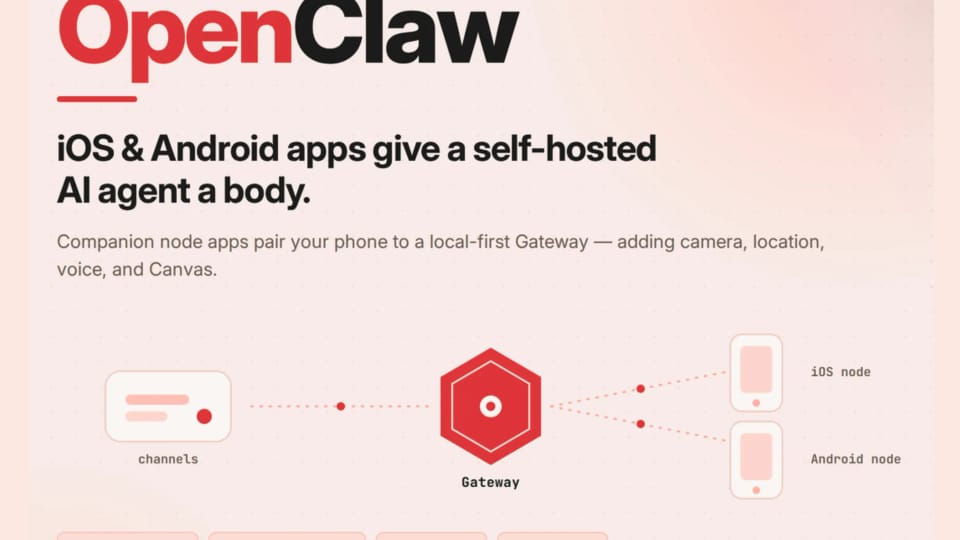
OpenClaw has launched native companion apps for iOS and Android, allowing users to integrate their smartphones as functional nodes within a self-hosted AI agent network. Rather than acting as standalone chatbots, these applications serve as hardware extensions for the OpenClaw assistant, which operates from a centralized Gateway. By connecting a phone to this architecture, users can grant their AI agent access to device-specific capabilities, including camera, location, voice, and interactive Canvas surfaces. The original reporting from marktechpost.com provides the source detail behind this update.
Architecture and Connectivity
The OpenClaw system is built on a Gateway-and-Nodes model, where the Gateway acts as the primary control plane for sessions, routing, and tool execution. Users run this Gateway on macOS, Linux, or Windows via WSL2. When a mobile device is paired as a node, it connects to the Gateway over a WebSocket on port 18789. On local networks, the apps utilize mDNS or Bonjour for discovery, while remote access is supported through Tailscale with a wss:// endpoint. Communication between the phone and the Gateway is strictly governed by an approval process. Every node must be explicitly authorized via the Gateway command-line interface before it can interact with the agent. This design ensures that the phone functions as a peripheral, with all chat messages and logic processing remaining on the Gateway rather than the mobile device itself. The AI Agents story also surfaces in Roblox launches AI powered Build tools..., adding another angle.
Expanding Agent Capabilities
Integrating a smartphone into the OpenClaw ecosystem provides the AI with a physical presence, enabling workflows that require real-world interaction. The iOS and Android apps allow the agent to utilize device hardware, such as capturing photos, accessing GPS coordinates for location-aware reminders, or reading notifications to draft replies. Additionally, the apps support a Talk Mode for continuous voice interaction and a Canvas surface that allows the agent to render live dashboards directly on the user's screen. Privacy remains a core component of the node architecture. Sensitive operations, such as camera snapshots or screen recording, are disabled by default. Users must manually opt into these capabilities by adding specific commands to an allowlist within their configuration files. Furthermore, features like camera and screen capture require the mobile application to remain in the foreground to function, preventing unauthorized background access. The same AI Agents question is explored in CAFE, which adds a research perspective.
Deployment and Usage
OpenClaw is an open-source project created by Peter Steinberger, with its core written in TypeScript and designed to run on Node 24 or Node 22.19+. The system is compatible with various chat platforms, including WhatsApp, Telegram, Discord, Slack, Signal, and iMessage. Because the agent is model-agnostic, users can bring their own API keys from their preferred providers to power the assistant. To begin, users install the Gateway on their host machine and pair their mobile devices using a QR code or setup code. Once the node is registered, the agent can be instructed to perform tasks through the user's preferred chat application. The system maintains persistent memory and supports a variety of community-developed skills and plugins, providing a flexible framework for those looking to build a personalized, self-hosted AI agent network. To see mobile in practice, Vibe Coding is Dead walks through a concrete example.