
Innogath
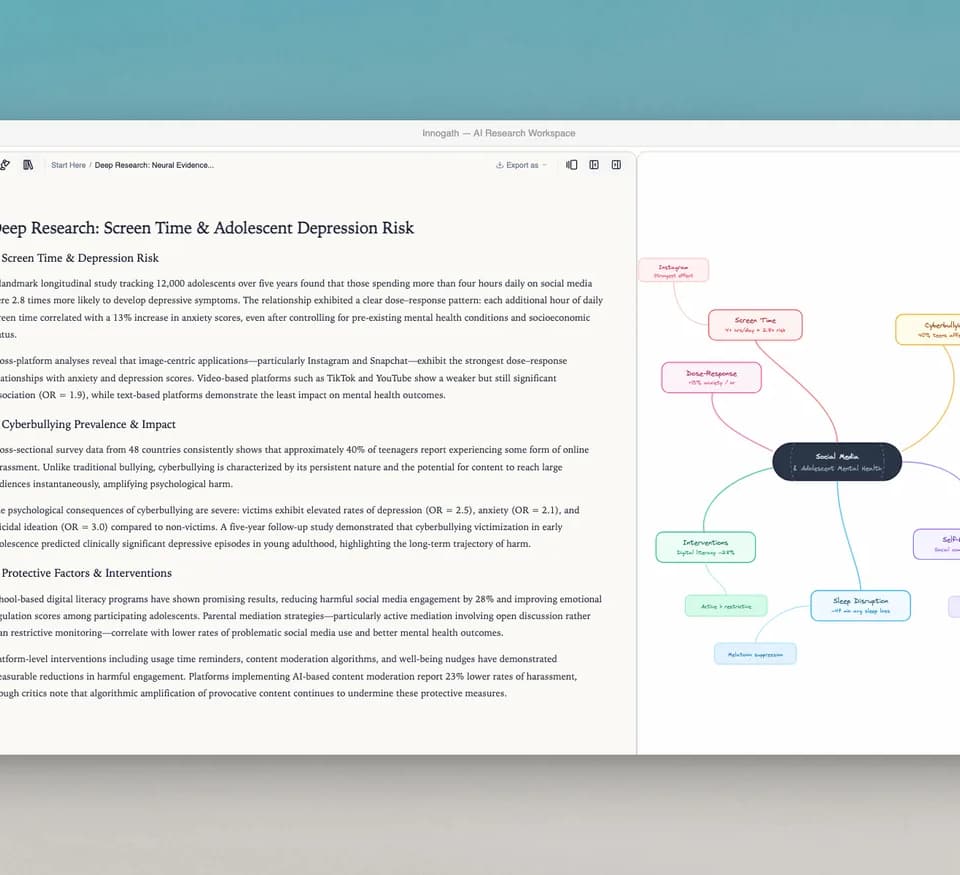
Innogath is a research workspace for questions that develop into several connected investigations. It combines structured reports with citations, a visual canvas and a project notebook. Follow-up questions can become child pages while retaining context from the original report, which helps separate a broad overview from a narrower question without losing the connection between them.
Choose the level of research the question needs
The product documentation distinguishes Fast, Thinking and Deep Research modes, with Auto choosing a route. Fast gives a direct chat answer without web search. Thinking can use files, prior context and lightweight search; Deep Research plans a report, reads evidence and produces sections with references and optional tables or diagrams.
You can attach documents, CSVs, images and links. If a report must rely only on uploaded files, the documentation recommends stating that restriction in the prompt. The activity stream records whether the system used web pages, files or earlier research. It can help identify why a result contains material outside the sources you expected, although the underlying passages still need examination.
Follow a claim into a separate branch
The workflow page describes selecting report text and using Reply to open a follow-up branch. A branch has its own report and diagram with parent context. You can also explore a diagram node and start a child research page from that topic.
The editable canvas supports visual structures such as timelines and comparison matrices, and can export as PNG. A diagram is another representation of the report, so check that its arrows and categories express relationships established by the evidence. Shared parent memory can preserve continuity, but an earlier inference should not become an unquestioned fact merely because a later branch inherits it.
For a writing-centered workflow, Clarami ties drafted claims to passages in a source library; Innogath instead organizes the investigation into connected reports and diagrams. Choose between those structures based on whether you need to refine a manuscript or explore a question's branches.
The marketing page promises verified sources and no hallucinations. The more careful documentation tells users to inspect citations and check important decisions against the underlying material. That is the appropriate standard: a linked source makes a claim inspectable, not automatically correct.
Keep notes connected when exporting
The notebook accepts selected report text with a source reference and clickable backlink. It supports rich-text editing, headings and embedded media, so you can assemble a brief while retaining the path back to the research. The documentation lists PDF, Markdown and DOCX report exports, plus a separate canvas image export.
Plans described in the docs are Free, Pro and Ultra, with different credit allowances; exact prices are not captured in these sources. Check the current allowance before planning a large batch of reports. Account settings include an all-project ZIP download, while deleting an account permanently removes its data. Preserve an export before a change that would end access to the working research tree.