
AI Ghostface
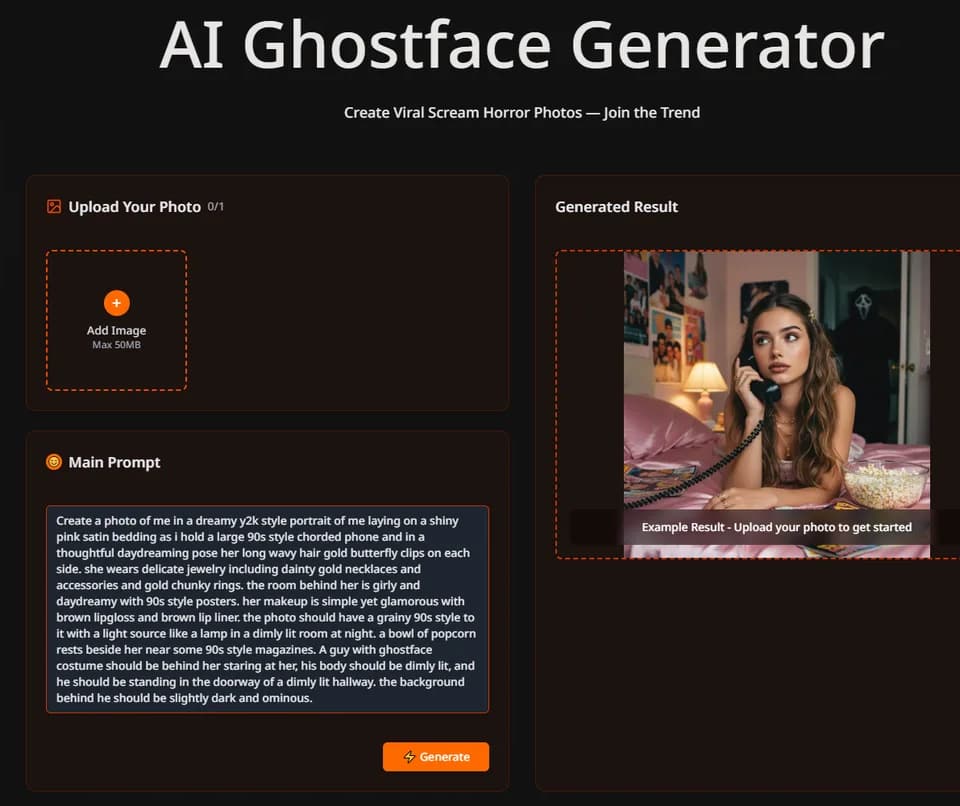
AI Ghostface turns an uploaded photo and written instructions into a horror-themed portrait. The homepage shows a single-image upload, a model selector, and an editable prompt that places a Ghostface-costumed figure behind the subject. It is a themed image workflow, not evidence of an official relationship with the Scream franchise or the model makers named in the interface.
Adapt the scene to your photo
The upload control lists a maximum file size of 50 MB and one image slot. Its model choices are Nano Banana, described as fast and low-cost, and GPT Image 2, described as high quality. Those descriptions are publisher labels; compare your own results rather than treating them as a measured quality ranking.
The example prompt specifies pose, clothing, lighting, room details, and the position of the costumed figure. Use that level of direction to explain what should change in your own image, rather than copying a scene that does not fit the reference. Check the person's face and hands alongside the background before deciding the edit is ready to share.
A generated result may also change details you intended to keep. Retain the original photo and review the output at full size, especially around jewelry and facial features. Obtain permission for another person's likeness and label a synthetic image when presenting it otherwise could mislead viewers.
Distinguish packs from subscriptions
The pricing page lists one-time packs of 400 credits for $4.90, 900 for $9.90, and 2,000 for $19.90. The publisher says pack credits never expire. Its displayed generation counts are sixteen, thirty-six, and eighty; check the selected model's task cost before assuming every operation consumes the same amount.
Subscription offers appear with monthly labels but explicit yearly charges. Basic shows $9.90 per month billed as $118.80 yearly, Pro $19.90 with $238.80 yearly, and Ultra $39.90 with $478.80 yearly. Confirm the chosen billing term and cancellation conditions before purchasing.
Check rights before using a themed image
Paid offers advertise a commercial license and unrestricted usage rights. Those claims do not establish that the service can grant permission for protected characters, branding, or a third party's photograph. Check the applicable terms for your intended use, particularly client campaigns or merchandise.
The homepage also links to video generation, but its visible photo editor does not establish a complete video workflow or output specification. Start with the function and file type you need. The introductory sources do not give a detailed upload-retention schedule, so review current privacy terms before submitting personal photographs.