
AppleBanana.pro
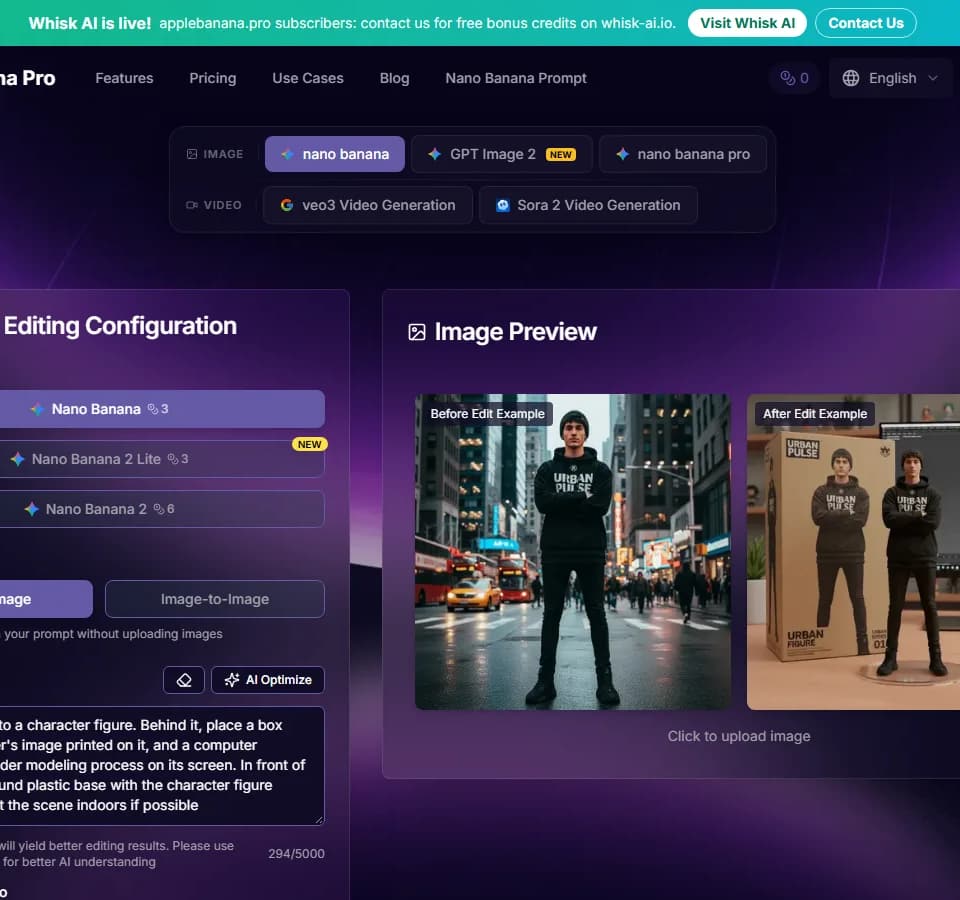
AppleBanana.pro is a website for generating and editing images through text prompts. The site labels its image-editing interface Nano Banana and presents both text-to-image and image-to-image modes. You can describe an image to generate or upload a photograph and request changes.
Describing an edit
The image-to-image workflow starts with an uploaded photograph. You then write a prompt describing the requested transformation. The website lists background replacement, object addition or removal, style changes, and color or lighting adjustments among the available editing tasks.
AppleBanana.pro supports background replacement, object edits, style transfer, and color correction. These are useful categories for product visuals, retouching, or creative images, all of which appear in the publisher's application examples. The website recommends detailed descriptions and suggests using English where possible for the model's understanding.
The editor also provides model selection, an output aspect ratio control, and a template library. Its text-to-image mode can generate from a prompt without an uploaded image. Select the mode that matches whether you want a new composition or a transformation of an existing picture.
Reviewing and downloading
The publisher describes comparison tools for examining the edited image. Its workflow includes reviewing the output and refining the prompt before downloading. This gives you a place to check whether the requested object placement, background, or style change fits the intended visual.
The page makes broad claims about natural integration and output quality. Those claims do not replace inspecting your own generated result, particularly if the edit must preserve a product's shape or match a reference photograph. The site also includes video generation entries, but the image editor is the clearest workflow described on this page.
Credits and access
AppleBanana.pro lists a free plan with 12 credits. Paid plans advertise larger credit allowances, watermark-free generated images, and commercial-use licensing. The editor shows a credit cost beside the selected generation action, while model options and advertised plan capacities differ.
The page offers monthly, annual, and one-time credit purchase choices. Check the selected billing option and model cost before paying. The website's plan examples describe different possible image and video totals, so a credit allowance should be read together with the generation type you expect to use.