
SparkReceipt
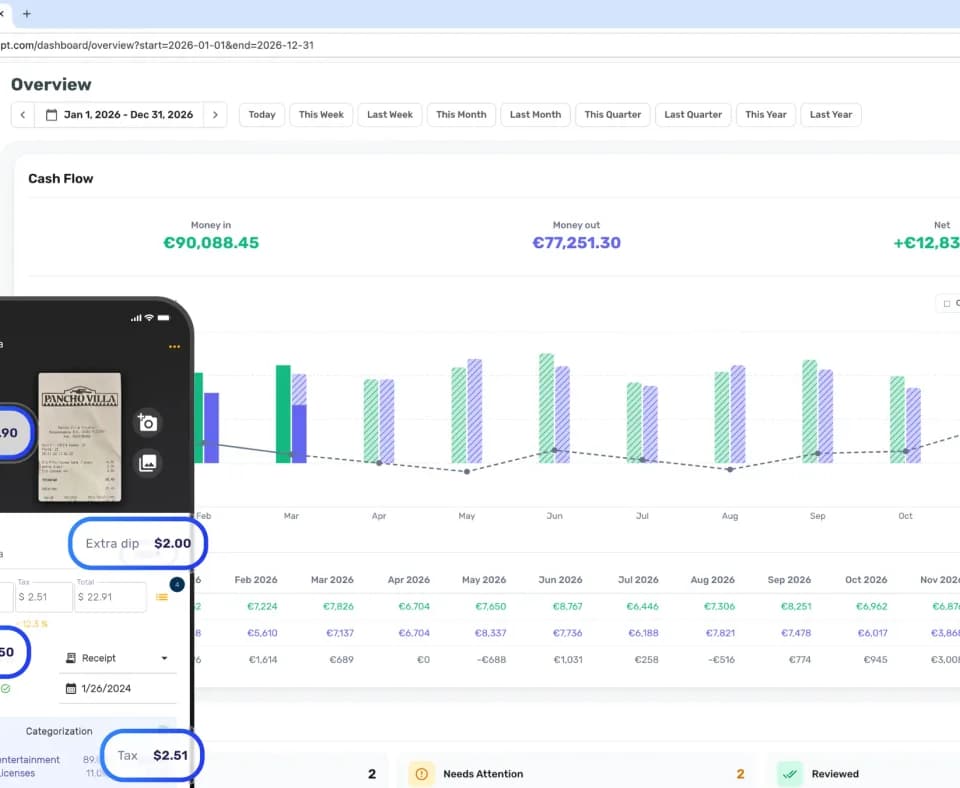
SparkReceipt collects receipts and invoices, extracts their details, and organizes expense records. Its official page describes a workflow across iOS, Android, and the web, with email imports, bank statement matching, mileage tracking, and accounting handoffs. It is aimed at freelancers and small businesses that need to keep supporting documents alongside transactions.
Capture paper and email receipts
You can scan paper receipts on a phone or upload documents. SparkReceipt extracts fields such as merchant, date, amount, tax, and currency, then categorizes the expense. Elite adds line-item extraction and configurable AI fields and filing rules.
Email connections support Gmail, Microsoft mail, and IMAP. The email feature page describes importing receipt and invoice emails, with automatic or manual approval. You can also forward selected receipts to a dedicated address. Historical scanning uses a chosen start date, and the publisher says the first 10,000 historical emails are included per account; larger scans use credits with the cost shown before processing.
Confirm proposed transaction matches
SparkReceipt accepts PDF, CSV, or Excel bank statements. Live bank connections are available in the United States. Its Transaction Manager proposes matching receipts by amount, date, and merchant, then asks you to confirm the link.
You can mark transfers or exclude personal lines, and create an entry when a transaction has no document to match. The interface tracks unmatched, needs-review, and reconciled items. A progress bar shows the state of the review; check that a proposed match actually refers to the right purchase before confirming it.
Hand records to accounting tools or an accountant
Reports can be exported in PDF, Excel, or CSV. The publisher describes publishing to QuickBooks Online and Xero with receipt images attached, as well as other integrations and import-file templates. Accountant access is included without taking a paid user seat.
SparkReceipt does not create or send invoices, run payroll, or file tax returns. Its purpose is to collect and organize the records those later processes need. The captured pages do not establish that a generated report resolves every accounting or filing requirement.
Compare plans and processing charges
The pricing page lists Pro at $6.90 monthly or $69 annually, and Elite at $12.90 monthly or $129 annually, before applicable tax. Both include one user and a seven-day trial; extra users cost $1 monthly or $12 annually.
Pro includes 50 documents per month shared across the account, one inbox, and one live bank feed. Elite offers unlimited documents under fair use, several inboxes and feeds, and additional automation. Bank statement extraction uses renewable credits, with one credit per transaction. Estimate those charges and any large email backlog separately from the document allowance.