
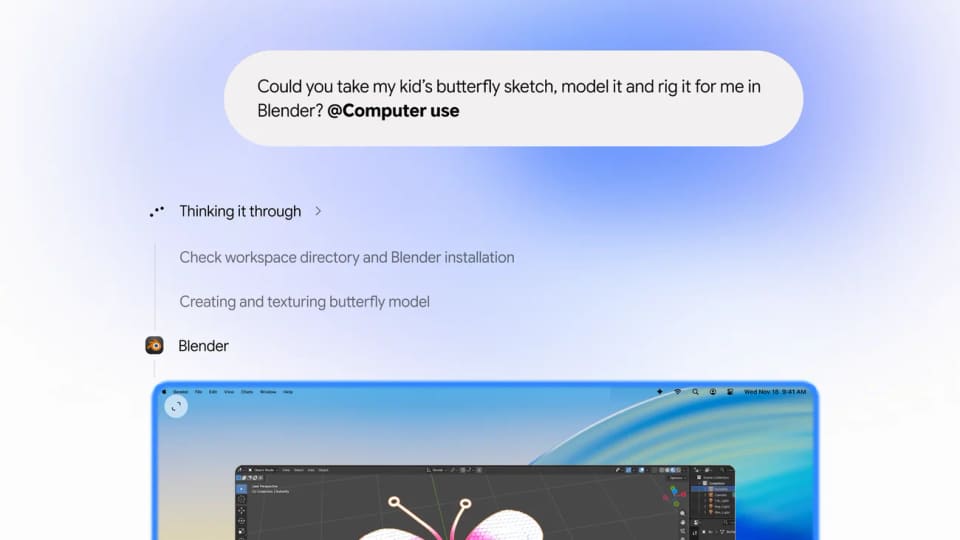
Google introduced computer use in the Gemini app for Mac on November 19, 2026, letting the assistant perform multi-step work across local files, desktop applications and websites. The company's announcement says the feature runs in a separate background window, leaving the user's main screen and cursor available.
What does Gemini computer use change on Mac?
Users can describe a workflow instead of manually performing each click, menu selection, typed entry or form field. Google says Gemini works in an isolated window and shows a live preview inside the chat. That is a more specific capability than asking an assistant to explain how to perform a task: the app can operate the interface itself.
The announced examples include batch color-grading photographs, setting up a 3D scene, extracting shipping details from PDFs and building a presentation from dashboard metrics and screenshots. Google also describes analyzing clothing photographs, researching prices and staging resale listings. These are publisher examples rather than Franklin hands-on tests or measured time savings.
Who can use Gemini’s Mac feature today?
Google says computer use is rolling out in English in the U.S. through the Gemini app for Mac. The captured announcement directs readers to download that app, but does not specify a wider geographic timetable, supported subscription tiers or a task-success benchmark.
The rollout wording matters: an announcement of availability in one market does not establish that every account or language already has access. Check the feature inside the installed Mac app and its current access requirements before planning a team workflow around it.
What control does the user retain?
Google says people choose which apps Gemini can access, watch its steps, pause at any time and approve key actions before they occur. The article's main text says key actions, which is more limited than assuming every individual click requires approval.
Franklin analysis: begin with a bounded task whose output can be inspected, such as preparing a draft presentation or staging listings. The next useful evidence is whether Gemini completes the exact app sequence reliably and presents consequential actions for review before execution.
