
Video Text Remover
Video Text Remover repairs selected lettering in uploaded videos. The browser service offers a limited trial and prepaid processing-minute packs.
Video Text Remover is a browser-based editor for repairing areas covered by lettering in a video. Its official website describes selecting the text and its on-screen time, then estimating the background underneath it for footage the user owns or has permission to edit.
How does Video Text Remover repair lettering?
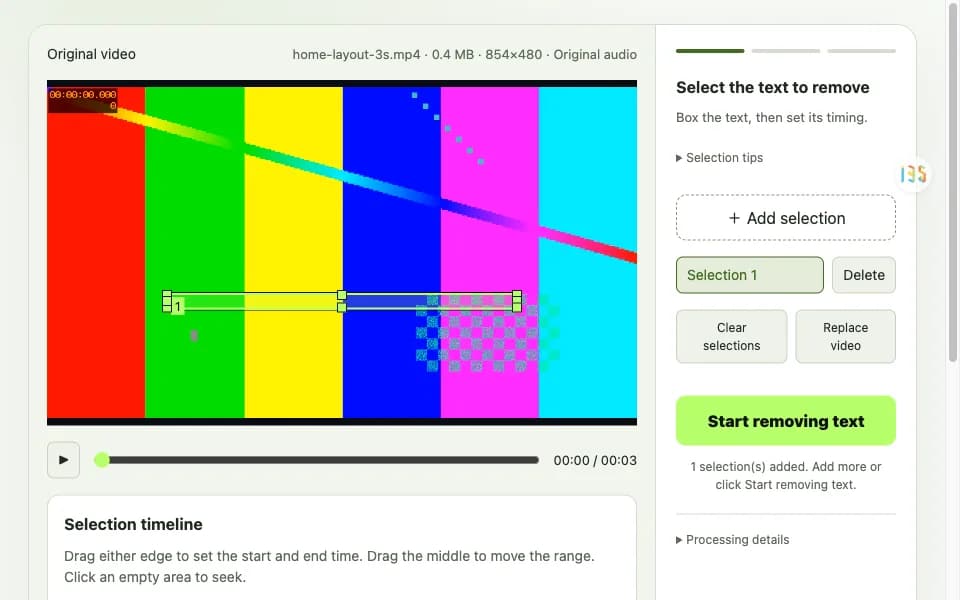
The service reconstructs the selected area rather than applying a blur filter. A user uploads a supported clip, draws a box around the lettering and sets the selection range. Outlines and drop shadows need to fit inside that box, according to the publisher’s instructions.
Burned-in subtitles are part of the picture, so hiding a separate subtitle track will not remove them. Recording timestamps and other labels can be targeted during the period when they appear. When lettering moves, the guide recommends separate boxes and time ranges instead of a large repair across the entire clip.
What can you try before buying?
The anonymous trial accepts one H.264 MP4 or MOV clip up to 30 seconds and 100 MB. That gives a creator a short sample for inspecting the repair before committing a longer video. The site presents the trial separately from its paid processing packs.
The publisher says exports retain the source picture dimensions and use the source average frame rate. Re-encoding can still change bitrate and fine detail, so retained resolution should not be read as a promise of an unchanged image.
How do the processing packs work?
Processing minutes are charged for the full uploaded clip after a successful repair. A shorter selection range does not reduce the charged duration. The site lists Starter, Creator and Pro packs with 40, 150 and 400 processing minutes respectively, sold as single purchases with a 365-day validity period.
For 1080p and lower resolutions, the documented maximum clip lengths are five, 15 and 30 minutes respectively. The stated limit for 2K video is one minute across all three plans. Check the current upload limits against the actual recording before buying a pack.
What should you inspect in the result?
Video text removal estimates what covered pixels might have shown. Moving backgrounds, hair and faces can make the repair harder to judge than lettering over a plain surface. Play the repaired interval at normal speed and examine its first and last selected frames for leftover letters, edge flicker or an unexpected background change.
Before you try it
Frequently asked questions
What files does the anonymous trial accept?
The trial accepts one H.264 MP4 or MOV video up to 30 seconds and 100 MB, without creating an account.
Official sourceDoes selecting a shorter interval reduce the charged minutes?
No. The publisher charges for the actual length of the uploaded video after successful processing, even when the selected lettering appears only briefly. Failed tasks do not consume the balance.
Official sourceCan I remove the text layer in Canva instead?
If the original Canva project is still editable, the publisher recommends removing its text layer and exporting again. That retains the original background rather than reconstructing covered pixels from the exported video.
Official sourceWill the exported video keep the original picture dimensions?
The publisher says the export retains the source frame dimensions within supported limits. Re-encoding can change fine detail, and repaired areas can show edges or flicker, so the result needs review in motion.
Official source