
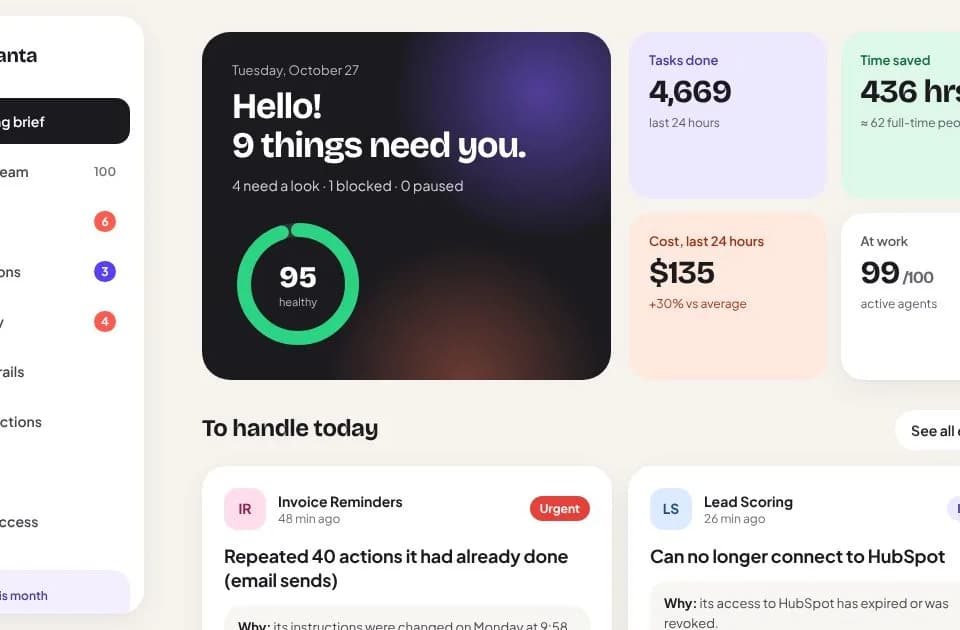
Orvanta: a control center for business AI agents
Orvanta monitors business AI agents, routes sensitive actions for approval and tracks budgets across connected automation tools.
Orvanta is a control center for businesses that run AI agents across automation services and custom code. The company describes a shared workspace for activity monitoring, approvals, budgets and agent instructions, while the underlying workflows stay on their existing tools.
What does Orvanta monitor?
Orvanta gives each agent a profile with its mission, owner, budget and trust level. Its official product page describes alerts for repeated actions, expired access, quiet workflows, cost spikes and quality issues. The dashboard also records tasks and reported time savings; these are product features rather than independently verified productivity results.
Operations leads can review agent activity alongside a history of human decisions. Versioned instructions allow a previous instruction set to be restored, and team members can report an incorrect answer to its owner. Optional AI review checks a sample of answers against instructions and flags possible problems for a person to assess.
How do approvals and pause controls work?
Sensitive actions can wait for human approval before a workflow continues. The site gives refunds and quotes above a threshold as examples. An approved request resumes the action, while a declined request does not proceed.
The strength of a pause depends on the connection. The n8n integration can switch a workflow off, while other workflows must use the relevant permission steps or API checks. Activity-only connections can be monitored but cannot be stopped. Orvanta says it identifies that distinction on each agent’s page, which makes integration coverage an important setup check.
How do teams get started?
Teams connect n8n with an API key, add Orvanta steps to Zapier, or report activity and request permission through its HTTP API. The page also names Make and GoHighLevel connections. Business owners can use the dashboard after the workflow builder establishes the connection.
What does Orvanta cost?
Orvanta is free during its beta. The company says the beta includes agents, workflows, approval controls and team logins, with later pricing to be announced before it applies. Teams evaluating agent monitoring should test which sensitive steps actually request permission and how those steps behave when the service is unavailable; the documented behavior is to stop a sensitive action rather than let it continue.
Before you try it
Frequently asked questions
Can Orvanta stop every connected agent?
No. Activity-only integrations can be monitored but cannot be stopped. Pause and approval controls require a supported integration or permission checks in the workflow.
Official sourceWhat happens if Orvanta is unreachable?
The company says sensitive steps fail closed: the workflow stops rather than running the action when it cannot obtain permission.
Official sourceDo teams have to rebuild their existing workflows?
The product supports connecting n8n by API key, adding Orvanta steps to Zapier, or integrating through code while agents keep running on their existing tools.
Official sourceCan the optional AI review be disabled?
Yes. The product page says AI review of answers is optional and can be turned off.
Official source