
Outstanding Tiny Desk AI for photo-based concert clips
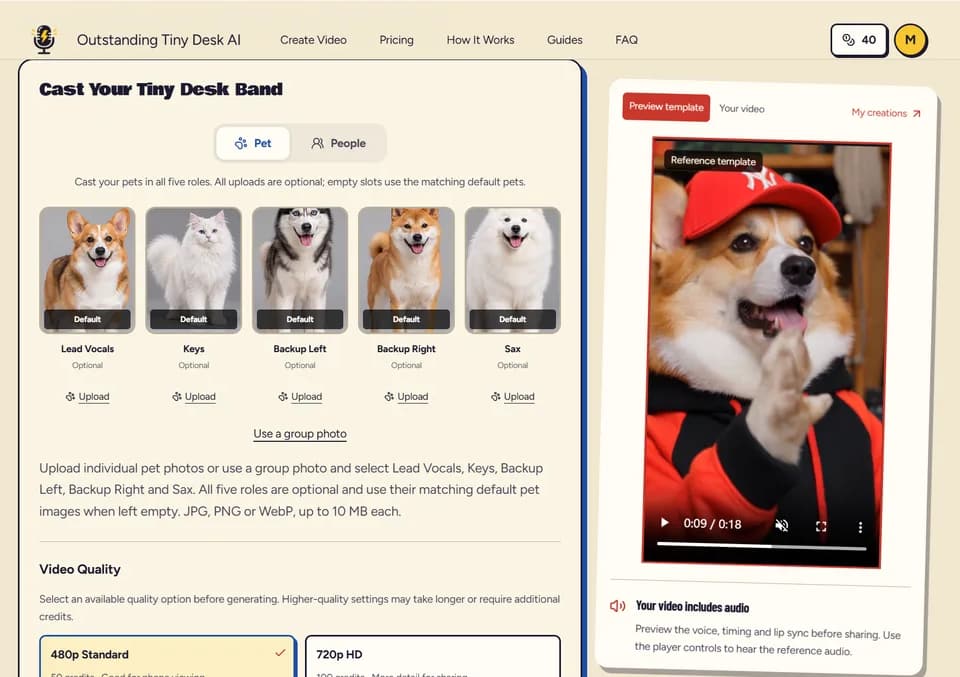
Outstanding Tiny Desk AI uses a prepared concert sequence and up to five photos assigned to performer roles.
Outstanding Tiny Desk AI makes a short vertical concert clip from uploaded photos and a prepared performance. The publisher lets you choose which positions to replace. Start by deciding whether you want one recognizable performer or a group where each portrait has its own role.
Assign the photos to the performers
The publisher accepts one to five photos and lists roles such as lead singer and saxophone player. Check the position for each image before generating. When you upload fewer than five photos, the service fills the remaining roles with generated performers. The publisher also offers a separate pet mode, so check which mode is selected before adding the images.
Listen to the clip before sharing it
The publisher describes using a prepared soundtrack for the concert. Play the output with audio and inspect the transitions between performers. If you plan to post it to a social platform, check that platform’s music rules and the rights for the intended use. A platform may mute a clip containing copyrighted audio. The preview can help you choose which take to download.
Choose the output and check the credit charge
The publisher lists 480p and 720p options for vertical 9:16 video. Choose the resolution based on where the clip will appear and review the credit quote for that option. The site offers one-time credit purchases. Keep the downloaded file if you expect to cut it into another video, and review the result before sending it to anyone else. Check the portrait crop if you want the main performer to stay recognizable on a small screen.
Before you try it
Frequently asked questions
How many performers can I replace?
The publisher lists up to five positions, including the lead singer and saxophone player.
Official sourceCan I put people and pets in the same clip?
The publisher describes separate human and pet modes and says the modes cannot be combined in one clip.
Official sourceWhich resolution options does the creator show?
The publisher lists 480p and 720p with vertical 9:16 framing.
Official source