
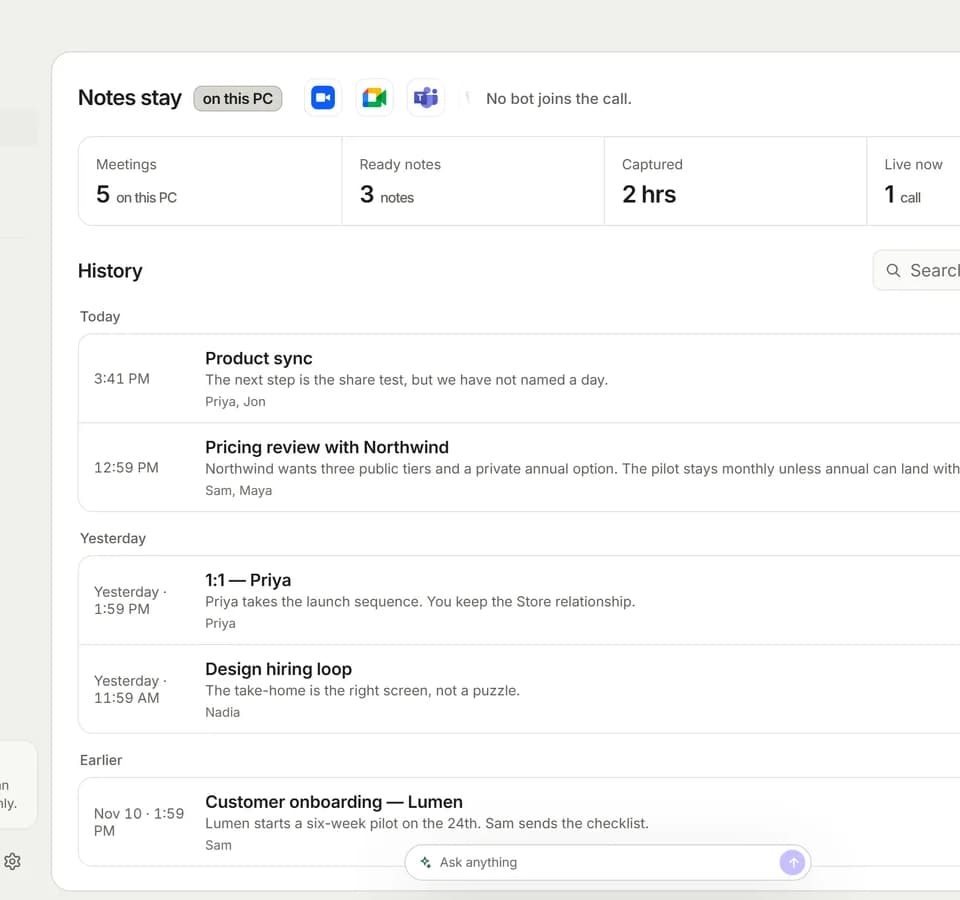
Annotated for local meeting transcription, notes and read-only MCP access
Annotated keeps meeting capture, transcription and initial notes on a Windows PC. It combines a seven-day trial with a one-time unlock and optional text-only use of a larger model.
Annotated is a Windows meeting notepad that transcribes locally and turns a call into notes, owners and next steps. Its official website says it works beside existing calls without joining the participant list as a meeting bot.
What does Annotated capture and organize?
The publisher describes transcription and the first summary running on the PC. Notes remain searchable in the local meeting history, and Markdown export allows selected notes to be shared.
A live coaching overlay offers cues during a call, such as a missing date or talk ratio. The website says the overlay is hidden from screen sharing. Ask can answer questions from meetings, notes, actions and calendar information already on the PC, with people, meetings or projects used to narrow the context.
How do models and MCP access work?
The documented default is local processing. A larger model is optional, and the publisher says that option sees text rather than meeting audio. Users can bring a Claude or OpenAI key for that path.
Annotated also describes a local, read-only MCP server. Compatible clients can search meetings, read summaries and retrieve next steps from the PC without a cloud hop. Read-only access still exposes the selected information to the connected client, so a user should review that connection before using private meeting material.
What does Annotated cost?
The website offers a seven-day trial and a $35 one-time unlock for one Windows PC. A two-key option is listed at $45. A $10 monthly subscription is marked coming soon and should not be treated as an available purchase plan.
Franklin analysis: begin with a meeting whose notes can be reviewed against what was actually agreed. Check the owners and dates, not just the summary’s readability. The publisher’s local-processing description and optional external text path are different choices; confirm which one is active for the intended meeting workflow.
Before you try it
Frequently asked questions
Does an Annotated bot join the call?
The publisher says no bot joins the participant list. Annotated runs beside the calls the user already attends and performs transcription and the first summary on the PC.
Official sourceCan other AI tools read Annotated’s notes?
The website describes a local, read-only MCP server for searching meetings, opening summaries and retrieving next steps. The connection operates against notes on that PC.
Official sourceIs Annotated’s monthly subscription available?
The captured page marks the $10 monthly subscription as coming soon. The currently described purchase route is the one-time unlock after a seven-day trial.
Official source