
OpenWorker
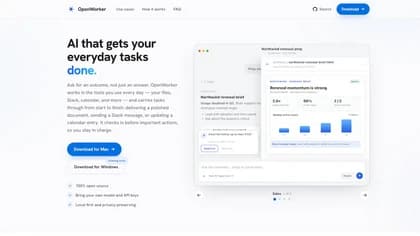
OpenWorker is a local-first desktop AI agent for turning requests into completed work across files, repositories, communication tools, calendars, and other connected applications. The OpenWorker app is described as free and open source, supports user-provided model providers or local models, and asks for approval before consequential actions.
What it does
Instead of returning only an answer, OpenWorker breaks an outcome into steps, performs the work on the user’s computer, and produces a deliverable such as a report, brief, Markdown file, PDF, image, draft message, or proposed code change. Examples shown by the publisher include preparing a renewal brief from CRM and email information, organizing a calendar conflict, summarizing an incident from Slack and GitHub, and prioritizing product feedback.
OpenWorker can connect to tools including Slack, email services, calendars, Notion, HubSpot, GitHub, Google Drive, Jira, Linear, Asana, Dropbox, Box, and other listed integrations. It supports cloud models, open-weight models through supported providers, and local models through Ollama. Users can switch models per task, including during a conversation, while supplying their own API keys where required.
Notable capabilities
- Approval-gated actions: The app presents check-ins before actions such as sending email, posting to Slack, opening a pull request, or running a command. For calendar conflicts, the examples show it checking availability, drafting reschedule notes, and asking for approval before sending a note.
- Security workflows: Security coworkers can run existing scanners, triage findings by reachability, review dependencies, and draft fixes as pull requests. The publisher says secret values are not printed in transcripts.
- Cloud posture review: The Cloud Posture coworker scans Terraform, checks AWS with read-only access, and drafts infrastructure changes without running
terraform applyor writing directly to the cloud. - Background triggers: Tasks can start from events such as a Slack mention, incoming email, or a schedule, then pause for approval before important actions.
- Local-first credentials: Passwords and tokens are stored in the app’s local secret store, while an optional cloud account brokers some OAuth sign-ins.
Who it helps
OpenWorker is aimed at people who want an AI assistant to work across the tools they already use rather than confining the interaction to a chat window. It may fit developers and defenders reviewing code or cloud configuration, operations teams handling alerts, sales and customer teams preparing account work, marketers assembling reports, and individuals managing email and calendars. The app also supports building a custom coworker by describing a job in plain language.
How it fits a workflow
A typical workflow is to state the desired result, connect only the relevant tools, let OpenWorker carry out the intermediate steps, and review the resulting artifact or proposed external action. Approved changes can leave the computer for destinations such as GitHub, Slack, or email; the examples show these transitions explicitly as approval points.
Strengths and limits
OpenWorker’s stated strengths are its open-source, local-first design, model flexibility, tool connections, and emphasis on human approval. It is free as an app, but users bring their own API keys or run a local model and pay any model provider directly. The publisher currently lists a Mac download, with Windows marked as coming soon. The degree of automation depends on the tools, permissions, model, and approval settings the user provides.