
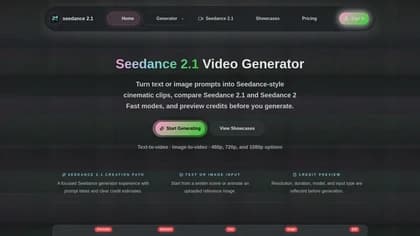
seedance-21.app
seedance-21.app is a third-party web video-generation service offering access to Seedance-branded models. It creates short clips from text prompts or reference images through a model, settings, and credit-based generation workflow; the reviewed publisher pages do not establish that it is an official ByteDance service.
What it does
The service supports text-to-video and image-to-video creation. Users choose a model, write a scene description or upload an image, select output settings, preview the estimated credit cost, and generate an MP4 clip. The publisher describes Seedance 2.1 as its primary or final-quality option, Seedance 2 as a standard-generation path, and Seedance 2 Fast as a lower-cost drafting mode.
Prompts can specify elements such as the subject, movement, camera motion, environment, lighting, and visual style. The publisher also presents a showcase gallery with example prompts, which can help users structure scene directions. This workflow is similar to seedance21.io, another Seedance-focused workspace that combines prompt or image inputs with configurable output settings, though the two services are separate products.
Notable capabilities
- Text-to-video generation from written scene prompts.
- Image-to-video generation using an uploaded reference image.
- Seedance 2.1, Seedance 2, and Seedance 2 Fast model options, as described by the publisher.
- 4–15-second MP4 clips, with 480p, 720p, and 1080p options described for Seedance 2.1 and Seedance 2; Fast mode is described for 480p and 720p drafts.
- Estimated credit costs shown before generation, with billing based on model, resolution, duration, and input type.
Who it helps
The tool is suited to creators, marketers, and other users who need short visual drafts from written concepts or still-image references. Its separate quality and speed modes may fit workflows that move from inexpensive experimentation to higher-quality final renders, while prompt controls support users who need to describe camera behavior, lighting, or movement rather than only a static subject.
How it fits a workflow
A practical workflow starts with a prompt or reference image, followed by model selection and output configuration. Users can compare the estimated credit requirement before running a generation, then review the resulting short clip. The publisher gives an example of approximately 300 credits for a five-second 720p text-to-video clip and approximately 150 credits for image-to-video, but these are examples rather than fixed subscription prices. No fixed subscription pricing was disclosed on the reviewed pages.
Strengths and limits
The documented workflow brings text-to-video and image-to-video generation, multiple model modes, short clip durations, and pre-generation credit estimates into one interface. The main qualification is publisher identity: the reviewed pages identify the service with the seedance-21.app brand but do not provide a legal corporate name or evidence that it is published by ByteDance. Output quality, generation speed, integrations, and broader account or export features are not established by the reviewed material.