
Nimbalyst
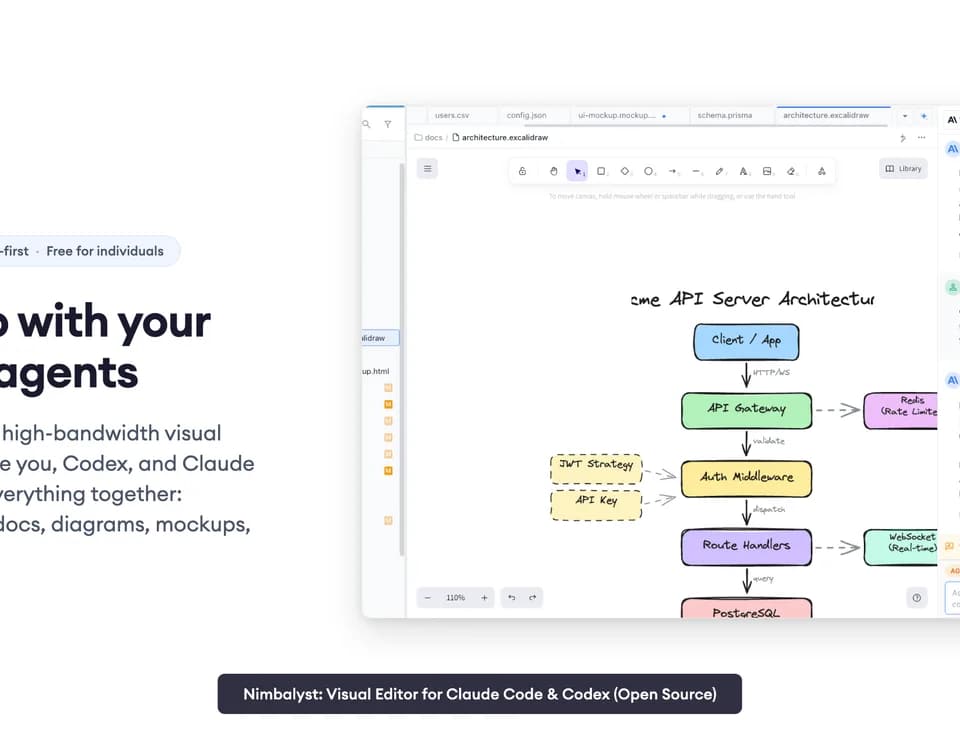
Nimbalyst is a visual workspace for working with coding agents across files, sessions and tasks. It supports Claude Code and Codex, with editors for Markdown, code, diagrams, mockups and tabular data. The publisher describes desktop and iOS applications under an MIT license.
The workspace and the agent's AI access are separate. Individual use is free, but you bring an existing supported subscription, API key or local-model access. Downloading Nimbalyst does not supply unlimited model usage or eliminate the agent provider's charges.
Keep plans and file changes together
The visual editors let a user inspect an artifact while interacting with an agent. Markdown supports rendered editing, and Mermaid or Excalidraw can represent diagrams. CSV editing uses a spreadsheet view. Code editing sits alongside a terminal and Git controls, so a task can retain its planning material and implementation changes in one workspace.
Nimbalyst describes red-and-green diffs for AI edits, with options to accept, reject or change the result. Use that review step to check whether an edit matches the request and preserves unrelated work. A well-presented diff can make inspection easier, but it does not establish that generated code passes tests or is safe to deploy.
Sessions can run in parallel and can use isolated Git worktrees. The session manager tracks files read or written and supports searchable history and resumption. Before dividing a project among agents, decide which files each task owns and how their results will be tested together. Parallel sessions are not automatic protection against overlapping edits.
Choose what becomes shared
The team workflow separates local files from documents and trackers that a user promotes to shared content. The publisher says only promoted material is synced, through a Cloudflare-based service, and access is limited to invited participants. Browser collaborators can open shared plans without installing the desktop application.
Review this distinction before sharing confidential specifications or source-related notes. Local code staying on the machine does not mean a promoted document stays local, and an agent's model connection is another data path to consider. Confirm team permissions, sync terms and provider policies for the material involved.
Separate workspace pricing from AI spending
The pricing page lists the Individual plan at zero dollars with no account or credit card required. Teams is shown at twenty dollars per user per month or two hundred dollars annually, while also marked free during beta. Check the current beta conditions before budgeting for a team.
Enterprise pricing is custom and includes options for a collaboration server in the customer's cloud, data residency and controlled model gateways. Those options need a discussion with the publisher rather than assumptions based on the free plan.
Nimbalyst is most relevant when reviewing agent work involves diagrams, planning files and code together. Evaluate it on an actual small task: inspect the agent's edits, run the project's checks and confirm that shared versus local content behaves as intended.