
Token Wise estimates prompt costs and offers optional prompt rewrites
A browser extension combines live token estimates with rewrite controls, local history and an optional API-monitoring setting.
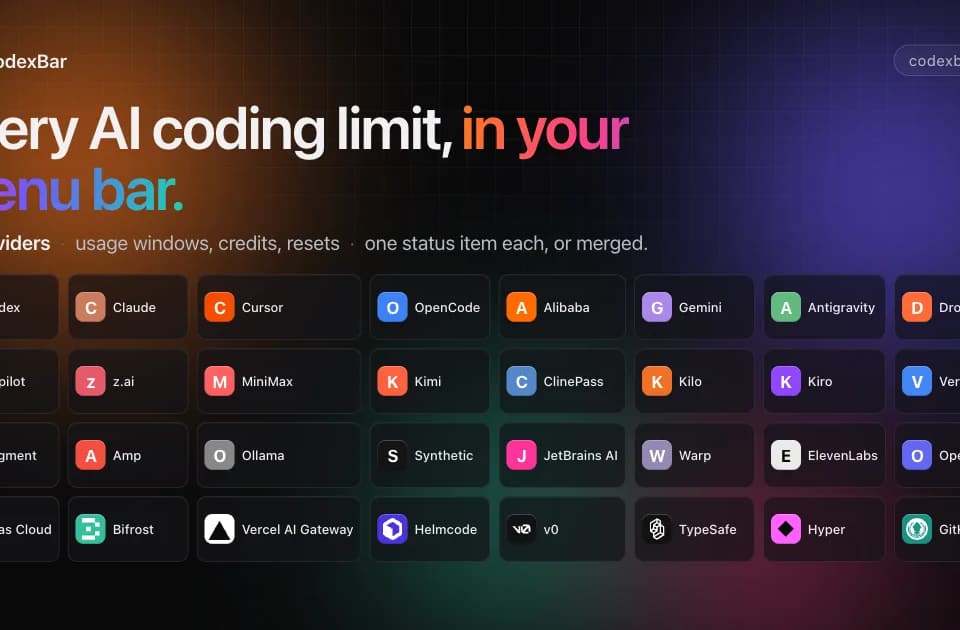
CodexBar is a free, open-source macOS menu-bar utility for viewing AI-provider usage windows, balances, spending information, and reset countdowns where available.
CodexBar puts AI-tool usage information in the macOS menu bar. The publisher describes tracking usage windows, credit balances, and reset countdowns across providers. It is a monitoring utility for services you already use, rather than a model subscription or a way to obtain extra capacity.
The site presents session, weekly, and monthly windows with countdowns to reset. The available information depends on what each provider exposes. A provider's presence in the list does not mean it offers every balance, spending, or reset field.
Use the display to check capacity before starting a long task, but confirm consequential billing information with the provider itself. Franklin has not tested the freshness of each integration or whether account changes appear immediately. Screenshots showing large token totals or example spending are demonstrations, not costs imposed by installing CodexBar.
The provider list labels different connection methods, including OAuth, cookies, API keys, CLI credentials, and local sources. Those methods have different access and handling requirements. Review the instructions for the specific service you want to monitor rather than assuming every integration uses the same login flow.
The homepage identifies some spending figures as estimates from local Codex logs. An estimate is distinct from an invoice or an authoritative account balance. Keep that distinction when reconciling costs across providers or deciding whether usage is on pace for a reset.
CodexBar is listed as free and open source, requiring macOS 14 or later. The homepage offers a Mac download and a package-manager installation option. It does not present the utility as a cross-platform desktop application.
Because the tool connects to paid services, examine its source and provider-specific permission guidance before supplying credentials. The fact that an application displays usage does not by itself establish how it stores tokens or session data. Franklin has not audited those controls. Evaluate one integration first and compare its display with the actual provider dashboard before relying on it for a wider set of accounts.
Before you try it
It shows usage windows, balances and spend where the provider exposes them. Configurable local cost scans add another view for Codex and Claude, but unavailable provider data should not be mistaken for zero usage or unlimited capacity.
Official sourceYes. Depending on the provider it reuses OAuth, device flows, API keys, browser cookies or local files. Safari-cookie access can need Full Disk Access, and some flows use the Keychain or request folder permissions; the lack of stored passwords does not mean no account access is needed.
Official sourceThe project describes a bundled CLI with the same usage output as the Mac menu bar, plus standalone macOS and Linux release tarballs. That terminal support is separate from the macOS menu-bar application and widgets.
Official sourceA browser extension combines live token estimates with rewrite controls, local history and an optional API-monitoring setting.

Wandesk is an AI desktop workspace with chat, built-in apps, shared context, personal memory, and an App Workshop for generating local applications.

Multica coordinates human and coding-agent work through issues, runs and reusable skills, while execution and model access remain with installed coding tools.

claudeapi.com is a Claude-compatible API gateway that provides direct access to Anthropic models.