
Vicoa
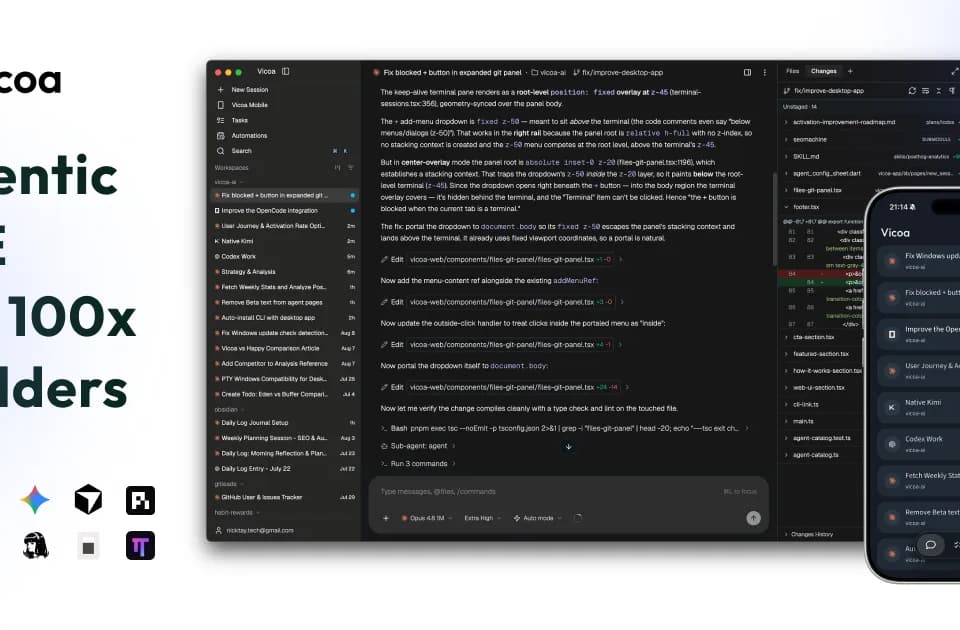
Vicoa is an agentic IDE and remote-control platform for running multiple coding agents across desktop, mobile, web, and remote machines. Vicoa states that agents and code remain on the user's own machines while conversations, approvals, and session status synchronize across devices.
What it does
Vicoa provides one workspace for starting and monitoring coding-agent sessions, including Claude Code, Codex, OpenCode, Gemini, Cursor, GitHub Copilot, Kimi, Hermes, Pi, Oh My Pi, Antigravity, and more than 30 additional agents through the Agent Client Protocol (ACP). Users can also connect another ACP-compatible agent with their own launch command.
Agents can run in parallel, optionally using separate Git worktrees to isolate tasks. Vicoa brings their live status into one view so users can identify sessions that are running, blocked, or finished. The interface also combines agent chat with file browsing, terminals, Git diffs, commit history, and in-place file editing. Its task board supports labels, subtasks, and agent sessions, while scheduled automations can start recurring runs.
Vicoa does not resell model access. Users bring their existing provider subscriptions or API keys and pay those providers directly, with no Vicoa usage markup according to the publisher. The pricing page lists a free plan with one remote machine and up to 10 automations, a $12-per-month Pro plan with unlimited machines and automations, and a custom Enterprise plan with administrative and deployment features.
Notable capabilities
- Cross-device control through desktop applications, the web interface, and iOS and Android apps.
- Parallel sessions for supported agents, with optional Git worktrees for isolated tasks.
- Mobile notifications, one-tap approvals, and synchronized conversations when an agent needs input.
- Built-in file exploration, live terminals, code diffs, commit history, and session review.
- Task boards and scheduled automations for organizing and repeating agent work.
Who it helps
Vicoa is aimed at developers and teams that use coding agents as part of software development and want to supervise several sessions without staying at the machine running them. It may also suit people who start work on a desktop and need to review, redirect, or approve changes from a phone or browser. Its agent-session and review model overlaps with Nimbalyst, which the supplied context describes as bringing multiple coding-agent sessions, project files, task tracking, and reviewable changes into one workspace. Vicoa's documented emphasis is cross-device remote control and connections to the user's existing machines.
How it fits a workflow
A typical setup starts by installing the desktop app or CLI, signing in, and launching an agent in a project directory. The CLI can be installed with npm i -g @vicoa/cli && vicoa. Users then start several sessions, inspect their status, browse files or terminal output, and continue the same conversations from the web or mobile app. The documentation describes notifications for permissions and input, plus the ability to share live session or task links.
Strengths and limits
Vicoa's main strength is coordination: it provides a single view for multiple agents while allowing control from different devices. Vicoa states that code stays on the user's machines and that its secure relay carries conversations rather than the codebase.
The service depends on compatible local coding agents and the user's own subscriptions or API keys; Vicoa does not include model access. Advanced multi-machine use requires Pro or Enterprise, while the free plan is limited to one remote machine and 10 automations. Provider policies and agent capabilities remain separate from Vicoa, so compatibility and usage terms can vary by agent.