
Swayclip
Swayclip is a video-first creator workspace with prompt and reference workflows for video, images, and music, plus model-specific settings and credit estimates.
Find AI tools for work, creativity and everyday tasks. Read what they do before you try them.
Swayclip is a video-first creator workspace with prompt and reference workflows for video, images, and music, plus model-specific settings and credit estimates.

TaleHug turns children’s written ideas or drawings into 4–10-page illustrated AI storybooks with parent-guided sharing controls.

AI Ghostface is a prompt-guided portrait editor for horror-themed images, with one-time credit packs and annual-billed subscriptions.
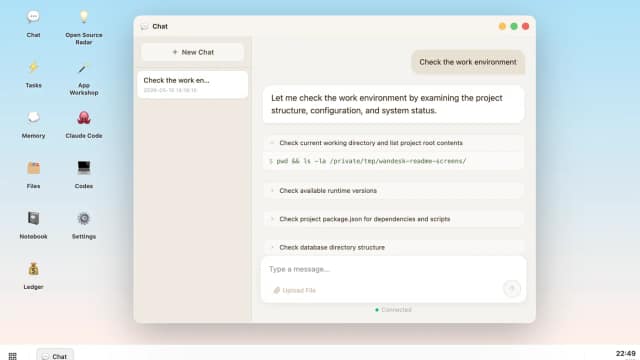
Wandesk is an AI desktop workspace with chat, built-in apps, shared context, personal memory, and an App Workshop for generating local applications.

Browser-based generator for real-world Minecraft worlds in Java or Bedrock, with custom area selection, cloud rendering, paid per-map pricing, and an optional Java-only Explorer Pack.
AI Remover erases baked-in video text through automatic detection or manual selection, reconstructing the selected background for preview and download.

Banana Video combines image and video generation with credit-based plans, prompt assistance, and targeted image marking for edits.

JobScout360 is Webs-Automation’s web-based job application bot. It supports configurable job preferences, automated applications across listed job platforms, and profile-based or...

Robinhood Agents connects AI workflows to a dedicated brokerage account, with model choice, trade approvals, and external-agent access through MCP.
Start with the job, not the brand. Pick a category, sort by newest to see recent launches, then open a tool page to read what it does, who it suits and where its official website is.
Sign in, choose Submit Tool, paste the tool’s official website, pick a category and add a sentence on what it does. Submitting is instant: it is saved straight away and appears in your submission history, where you can follow it through to its published page.
Yes. Founders and makers are welcome to submit their own tools. Link the official product page rather than a social post or app store listing, so readers land in the right place.
Some are free, many have a free plan, and some are paid only. Each tool page links to the official website, which has the current pricing, because plans and prices change often.
New tools are added every day. Sort by Newest first to see the latest additions, or follow the AI Tools RSS feed to get them as they are published.