

Drizz
Drizz automates mobile UI tests from plain-English steps, with real-device execution, test artifacts and CI integration.
Find AI tools for work, creativity and everyday tasks. Read what they do before you try them.
Drizz automates mobile UI tests from plain-English steps, with real-device execution, test artifacts and CI integration.

ArchRender makes architectural visuals from drawings, sketches and 3D models, with editing, environmental controls and project-based organization.

AI Seed Dance 2, a product of TopAI Tools, is a cutting-edge AI tool designed to generate animated dance videos from text prompts. This innovative platform allows users to describe a...

Lenzo streamlines the complex process of export compliance and sanctions screening, automating tasks to ensure businesses adhere to international regulations. Its key features include...

TurboApply AI offers managed job applications and hiring-manager outreach using human assistants, with a dashboard for following application and email activity.

Selfstorming is an innovative AI tool designed to streamline the branding and marketing strategy development process. It generates comprehensive strategies, encompassing brand...
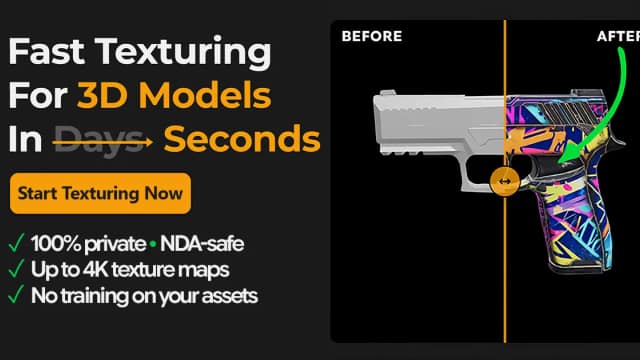
TextureFast generates PBR texture maps for existing UV-unwrapped 3D models through a web app or Blender addon, while the publisher says the complete mesh stays local.

Eler creates architectural renders using an uploaded model, selected camera angles, and visual style references, with ten free renders offered at signup.

AgentMail provides email inboxes for AI agents, with developer-oriented tools and plans that set inbox, email, storage, and team allowances.
Start with the job, not the brand. Pick a category, sort by newest to see recent launches, then open a tool page to read what it does, who it suits and where its official website is.
Sign in, choose Submit Tool, paste the tool’s official website, pick a category and add a sentence on what it does. Submitting is instant: it is saved straight away and appears in your submission history, where you can follow it through to its published page.
Yes. Founders and makers are welcome to submit their own tools. Link the official product page rather than a social post or app store listing, so readers land in the right place.
Some are free, many have a free plan, and some are paid only. Each tool page links to the official website, which has the current pricing, because plans and prices change often.
New tools are added every day. Sort by Newest first to see the latest additions, or follow the AI Tools RSS feed to get them as they are published.